
Remote Work Setup: A Complete Guide to Building a Productive Home Workspace
A remote work setup is more than just a laptop on a table. It is a well-planned workspace that helps people work from home in a comfortable, organized, and productive way. Over the past few years, remote work has become very popular. Many companies now allow employees to work from home or from anywhere in the world.
But here’s the thing: working from home can be amazing, yet it can also be distracting if the environment is not set up properly. That’s why creating the right remote work setup is important. A good setup improves focus, protects your health, and helps you stay motivated throughout the day.


In this complete guide, you will learn how to build the perfect remote work setup, what equipment you need, and how to create a space that supports productivity and comfort.
What Is a Remote Work Setup?
A remote work setup refers to the tools, furniture, technology, and workspace arrangement used by people who work from home or outside a traditional office.
Instead of commuting to an office building, remote workers complete their tasks using digital tools and communication platforms.
A typical remote work setup may include:
- A computer or laptop
- Reliable internet connection
- Desk and comfortable chair
- Proper lighting
- Communication software
- Noise control tools
When these elements are arranged thoughtfully, they create a productive work environment at home.
Why a Good Remote Work Setup Matters
Working from home sounds simple, but without the right workspace, it can become stressful. A proper remote work setup makes daily work easier and more enjoyable.
Key Benefits of a Good Setup
Better Productivity
A clean and organized workspace helps people stay focused and complete tasks faster.
Improved Comfort
Ergonomic furniture protects the body from pain or strain.
Professional Communication
Good technology ensures smooth meetings and clear conversations.
Work-Life Balance
A dedicated workspace helps separate personal life from work.
Less Stress
When everything is organized, workers feel calmer and more confident.
In short, a strong remote work setup creates a healthier and more efficient work routine.
Choosing the Right Location for Your Remote Work Setup
Before buying equipment, you should decide where to place your workspace. The location plays a huge role in productivity.
Factors to Consider
Quiet Environment
Choose a place with minimal noise. A quiet area allows you to concentrate better.
Natural Light
Sunlight improves mood and reduces eye strain.
Comfortable Temperature
Avoid spaces that are too hot or too cold.
Limited Distractions
Try to stay away from television areas or busy household spaces.
Possible Workspace Locations
- A spare bedroom
- A quiet corner of the living room
- A dedicated home office
- A small desk near a window
Even a small area can become a powerful remote work setup if arranged wisely.
Essential Equipment for a Remote Work Setup
To work efficiently from home, certain tools are necessary. These tools support communication, organization, and productivity.
Basic Technology Needs
Computer or Laptop
This is the most important tool in any remote work setup. It should be fast enough to handle your daily tasks.
Reliable Internet Connection
A stable internet connection ensures smooth video meetings and quick file sharing.
Headphones or Headset
Noise-canceling headphones help block distractions during meetings.
Webcam
A clear webcam allows professional video communication.
Microphone
A good microphone improves audio quality during calls.
Helpful Accessories
- External keyboard
- Computer mouse
- Laptop stand
- Monitor screen
- USB hub
These items may seem small, but together they make your remote work setup far more efficient.
Choosing the Best Desk and Chair
Comfort matters a lot when working long hours. A poorly designed workspace can cause back pain, neck strain, and fatigue.
Features of a Good Desk
- Enough space for computer and accessories
- Stable and sturdy design
- Comfortable height
- Cable management options
Features of a Good Office Chair
- Adjustable height
- Lumbar support for the lower back
- Comfortable cushioning
- Armrests for support
A comfortable chair and desk form the foundation of a healthy remote work setup.
The Importance of Ergonomics in a Remote Work Setup
Ergonomics means designing a workspace that fits the human body. When your workstation is ergonomic, it reduces strain and improves comfort.
Simple Ergonomic Tips
Monitor Position
The top of your screen should be at eye level.
Keyboard Placement
Your elbows should form a 90-degree angle when typing.
Chair Height
Feet should rest flat on the floor.
Posture
Sit straight with your back supported.
Breaks
Take short breaks every 30–60 minutes.
Even small ergonomic improvements can make a huge difference in your remote work setup.
Lighting Tips for a Better Remote Work Setup
Lighting affects productivity, mood, and eye health. Poor lighting can cause headaches and fatigue.
Types of Lighting to Use
Natural Light
Working near a window improves mood and energy.
Desk Lamps
Adjustable desk lamps help focus light on your workspace.
Soft Ambient Lighting
Gentle room lighting prevents harsh shadows.
Lighting Mistakes to Avoid
- Working in very dark rooms
- Placing bright light directly behind your screen
- Using overly bright bulbs
A well-lit environment helps create a comfortable remote work setup that supports long work hours.
Organizing Your Workspace for Maximum Productivity
A messy desk often leads to a messy mind. Organizing your workspace keeps your workflow smooth and efficient.
Simple Organization Tips
- Use cable organizers
- Store documents in folders
- Keep only essential items on your desk
- Use shelves or drawers for storage
- Clean your desk regularly
Digital Organization Matters Too
Your remote work setup should also include digital organization.
Helpful habits include:
- Naming files clearly
- Using cloud storage
- Creating organized folders
- Backing up important data
When both your physical and digital spaces are organized, work becomes much easier.
Useful Software for a Remote Work Setup
Remote workers rely heavily on digital tools to stay connected and productive.
Common Types of Remote Work Tools
Communication Tools
Used for messaging and video meetings.
Examples include:
- Video conferencing platforms
- Team messaging apps
Project Management Tools
These tools help teams track tasks and deadlines.
File Sharing Tools
Cloud storage services allow workers to access files from anywhere.
Benefits of Digital Tools
- Faster communication
- Better team collaboration
- Easier project tracking
- Secure document sharing
Software tools are an essential part of every modern remote work setup.
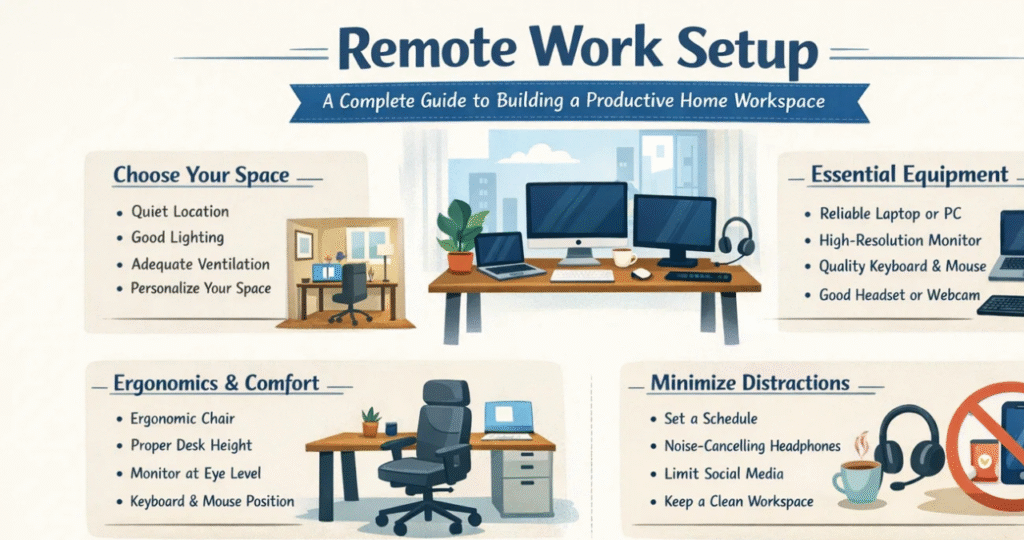
Managing Noise and Distractions at Home
Working from home can be noisy, especially in busy households. Managing distractions is key to staying productive.
Ways to Reduce Noise
- Use noise-canceling headphones
- Play soft background music
- Close doors or windows
- Add rugs or curtains to absorb sound
Limiting Digital Distractions
- Turn off unnecessary notifications
- Use focus apps
- Schedule work hours clearly
When distractions are controlled, your remote work setup becomes much more productive.
Creating a Healthy Work Routine
Even with the best workspace, productivity depends on daily habits.
Healthy Remote Work Habits
Start the Day with a Plan
Write down your tasks before starting work.
Take Regular Breaks
Short breaks improve focus and energy.
Stay Active
Stretch or walk around during breaks.
Maintain Work Hours
Set clear start and end times.
Stay Hydrated
Drink water throughout the day.
A good routine works hand-in-hand with your remote work setup to keep you focused and energized.
Sample Remote Work Setup Checklist
The following table shows the key elements needed for an effective remote work setup.
| Category | Essential Items | Purpose |
|---|---|---|
| Technology | Laptop or computer | Main work device |
| Internet | High-speed connection | Communication and file sharing |
| Furniture | Desk and ergonomic chair | Comfort and posture support |
| Accessories | Monitor, keyboard, mouse | Improved productivity |
| Lighting | Desk lamp or natural light | Reduce eye strain |
| Audio Tools | Headphones and microphone | Clear meetings |
| Organization | Storage drawers or shelves | Workspace cleanliness |
| Software | Communication and project tools | Team collaboration |
Using this checklist can help anyone build a reliable remote work setup step by step.
Budget-Friendly Remote Work Setup Ideas
Not everyone has a large budget, and that’s perfectly okay. A great remote work setup doesn’t have to be expensive.
Affordable Ideas
- Use a sturdy dining table as a desk
- Add a laptop stand made from books
- Use natural light instead of buying expensive lamps
- Choose basic ergonomic chairs instead of luxury models
Smart Budget Tips
- Buy only essential tools first
- Upgrade equipment gradually
- Look for second-hand office furniture
With a little creativity, anyone can build an effective remote work setup without spending too much money.
Future Trends in Remote Work Setup
Remote work continues to grow, and new technologies are changing how people work from home.
Emerging Trends
Smart Home Offices
Future workspaces may include voice-controlled lighting and smart desks.
Virtual Collaboration Tools
Advanced software will make online teamwork more interactive.
Flexible Workspaces
Workers may move between home offices, coworking spaces, and cafés.
Improved Ergonomic Furniture
New designs will focus more on health and comfort.
As technology evolves, the modern remote work setup will become even more efficient and comfortable.
Final Thoughts on Building the Perfect Remote Work Setup
Creating the ideal remote work setup doesn’t happen overnight. It takes planning, experimentation, and gradual improvement. However, once the right workspace is built, the benefits are clear: better productivity, greater comfort, and improved work-life balance.
Remember, a good remote work setup combines the right technology, ergonomic furniture, proper lighting, and a distraction-free environment. When these elements work together, working from home becomes not just possible—but enjoyable.
Whether you are a freelancer, a student, or a full-time employee, investing time in designing a smart remote work setup will help you succeed in the modern digital workplace. With the right tools and habits, your home workspace can become a powerful center of creativity, focus, and productivity.
You may also read
Affordable Dental Implants: A Complete Guide to Restoring Your Smile