How to Unpin Someone on Snapchat: The Ultimate Guide
How to Unpin Someone on Snapchat: Snapchat is one of the most popular social media apps in the world. Millions of people use it every day to stay connected with friends, share moments, and express themselves creatively. One of the features that Snapchat offers is the ability to pin friends or conversations to the top of your chat list. While pinning can help you prioritize important friends, there are times when you might want to unpin someone on Snapchat. Whether it’s to declutter your chat list, remove someone you no longer talk to frequently, or simply reorganize, this guide will walk you through every step in an easy, understandable way.


What Does It Mean to Pin and Unpin on Snapchat?
Before we dive into how to unpin someone on Snapchat, it’s important to understand what pinning really does.
- Pinning a conversation keeps it at the top of your chat list. This means even if your friend sends fewer messages, their conversation remains easy to access.
- Unpinning a conversation removes it from the top of your chat list, allowing your chats to return to their regular chronological order.
Think of pinning as giving a friend VIP status in your chat list. Unpinning is like letting them back into the regular crowd still important, but no longer taking the front seat.
Why You Might Want to Unpin Someone on Snapchat
There are several reasons why someone might want to unpin someone on Snapchat:
- Change in priorities: You may have pinned someone you chatted with a lot before, but now your conversations with others have become more frequent.
- Decluttering your chat list: Too many pinned conversations can make it hard to find other important chats.
- Privacy reasons: Sometimes you want to keep certain chats less visible on your main screen.
- Personal choice: Maybe you just feel like reorganizing your chat list.
No matter the reason, unpinning is simple and quick once you know the steps.
Step-by-Step Guide: How to Unpin Someone on Snapchat
Let’s walk through the process step by step. Follow these instructions carefully to unpin someone on Snapchat effectively.
Step 1: Open the Snapchat App
- Unlock your phone and tap on the Snapchat app icon.
- Make sure you are logged in with your account.
Step 2: Go to Your Chat List
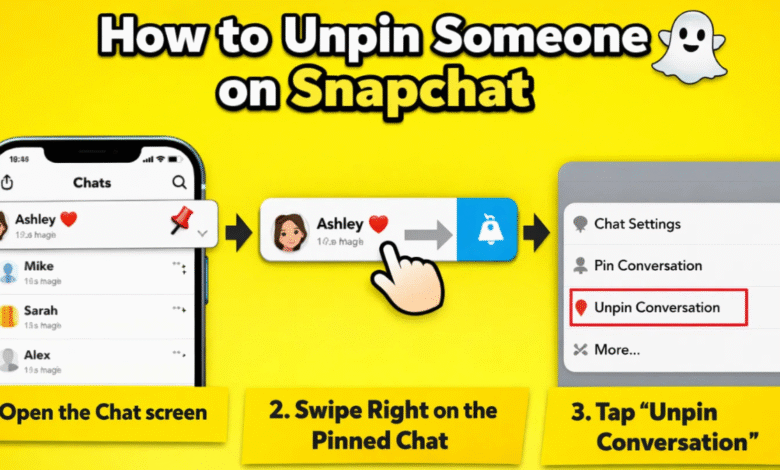
- Swipe right from the camera screen or tap the chat icon at the bottom left of the screen.
- This will open your list of conversations.
Step 3: Locate the Pinned Conversation
- Pinned conversations are marked with a yellow pin icon next to the friend’s name.
- Scroll through your chats until you find the person you want to unpin.
Step 4: Tap and Hold the Conversation
- Press and hold the conversation. A menu will appear with multiple options.
Step 5: Select “Unpin Conversation”
- From the pop-up menu, tap “Unpin Conversation”.
- The yellow pin icon will disappear, and the conversation will return to its regular position in chronological order.
Step 6: Confirm the Change
- Sometimes Snapchat may ask for confirmation. Simply confirm, and your friend will be unpinned.
- That’s it! You’ve successfully learned how to unpin someone on Snapchat.
Quick Tips to Manage Your Snapchat Pins
Managing your pins effectively can make your Snapchat experience more enjoyable. Here are some tips:
- Limit pinned chats: Too many pins can clutter your chat list. Try to keep only your top 3–5 friends pinned.
- Regularly review pins: Check periodically to see if you still want to keep the same friends pinned.
- Use search: If your chat list is long, use the search bar to find pinned conversations quickly.
- Update the app: Ensure you have the latest Snapchat version, as older versions may have different steps.
Troubleshooting: What to Do If You Can’t Unpin Someone
Sometimes, you might run into problems while trying to unpin someone on Snapchat. Here’s how to fix them:
| Problem | Solution |
|---|---|
| Unpin option not appearing | Make sure your Snapchat app is updated. Try restarting the app or your phone. |
| Conversation won’t move after unpinning | Check your internet connection. Sometimes the change takes a few seconds to reflect. |
| Pinned friend disappeared | They may have deleted their account or blocked you. Confirm by checking their profile. |
| Snapchat glitch | Log out and log back in. If the problem persists, reinstall the app. |
How to Pin and Unpin Multiple Friends
Snapchat doesn’t currently allow unpinning multiple friends at once, but you can manage your pins efficiently:
- Pin only top friends: Decide who truly deserves to stay pinned.
- Unpin old chats: Regularly remove inactive conversations from the top.
- Use emojis or labels: Although not official, some users add emojis in front of names to remember who’s pinned temporarily.

Understanding Snapchat Pin Behavior
Knowing how pins behave can help you manage your chat list better:
- Pins are personal: Only you see pinned conversations at the top. Your friend won’t know if they’re pinned or unpinned.
- Pins don’t affect chat order: When unpinned, conversations simply follow the chronological order based on message activity.
- Multiple pins allowed: Snapchat allows you to pin several friends, but over-pinning may make it confusing.
Common Myths About Unpinning on Snapchat
There are some misconceptions about unpinning. Let’s clear them up:
- Myth 1: Unpinning someone deletes the chat.
- False. The chat remains in your list; it just moves down.
- Myth 2: Your friend knows when you unpin them.
- False. Pins are private, so your friend has no notification.
- Myth 3: You can’t pin someone again after unpinning.
- False. You can re-pin anyone anytime by following the pin steps.
Benefits of Learning How to Unpin Someone on Snapchat
Knowing how to unpin someone on Snapchat is more than just a neat trick it offers real benefits:
- Better chat management: Your most important conversations stay at the top.
- Improved focus: Avoid distractions by unpinning friends you don’t need immediate access to.
- Enhanced privacy: Keep sensitive conversations less visible.
- Organized app experience: A clean chat list is easier to navigate.
Conclusion: Mastering Pins and Unpins
Snapchat is all about connecting and expressing yourself in a fun, easy way. Knowing how to unpin someone on Snapchat gives you control over your chat list and improves your experience on the app. Whether you’re cleaning up your conversations, prioritizing new friends, or just organizing for peace of mind, the steps are simple: open your chat, locate the pinned conversation, hold and select “Unpin Conversation”, and you’re done.
Remember, pins are personal, and unpinning doesn’t delete your chats or alert your friends. With these tips, you can keep your Snapchat organized, efficient, and stress-free. So go ahead pin, unpin, and enjoy a smooth, well-managed Snapchat experience!